Pennylane
Connect Pennylane to Delos to access your accounting data from the Assistant.
Connect Pennylane to Delos
Connect Pennylane to Delos to query your accounting in plain language: client files, general ledger, entries, banking, VAT, invoices. A single Pennylane card offers three ways to connect.
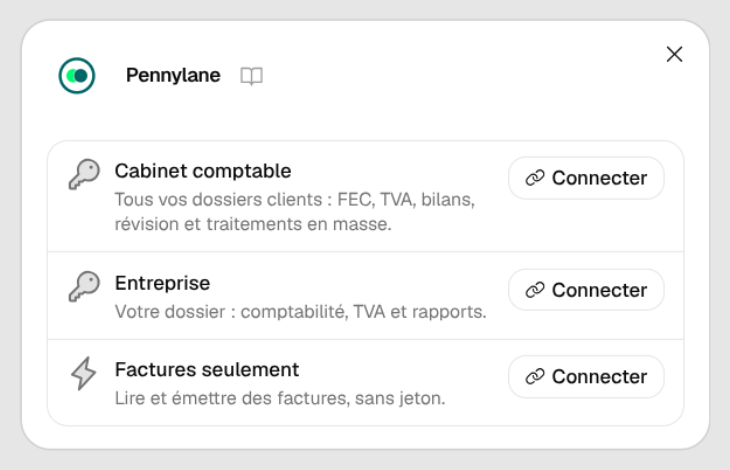
Choose your connection
| Option | Who it is for | Access | Authentication |
|---|---|---|---|
| Pennylane — Accounting firm | Chartered accountants | All the firm's client files, all features | Firm API token: in Pennylane, Firm settings > API tokens |
| Pennylane — Company | A single company | All of that company's accounting. Everything except document management (list, read, upload documents) and the search for accruals and deferred income | Company API token: in Pennylane, Settings > Connectivity > Developers |
| Pennylane — Invoices only | One-click connection | Supplier and customer invoices, entries and their supporting documents, payments, creation and finalization of customer invoices. No trial balance, no general ledger analysis, no VAT or financial statements | No token: click Connect and authorize on the Pennylane page |
Token permissions to tick (Accounting firm and Company)
When creating the token in Pennylane, tick: companies:readonly, exports:fec, trial_balance:readonly, fiscal_years:readonly, journals:readonly, ledger_accounts:all, ledger_entries:all, transactions:readonly, dms_files:all, supplier_invoices:readonly, customers:readonly, customer_invoices:all.
The token is personal: it gives the access of the person who created it and is never shared with the rest of the organization.
What you can ask
- Files: "List the firm's companies", "What is this company's identity?", "What are its fiscal years (open, closed, frozen)?"
- Analyses on the whole general ledger (computed from the FEC, exact sums whatever the volume): "Give the trial balance of these companies", "Totals by account", "Breakdown of counterparties by third party", "Review checks", "Search lines by account, third party, label or amount", "Export the general ledger or the FEC to Excel"
- Entries: list, view details (lines, periods, lettering), download attachments, create an entry (miscellaneous journal entry, provision, reclassification), edit an entry, create an account
- Bank: transactions and missing supporting documents
- VAT and statements: VAT by month (collected, deductible, net due, CA3 amounts), simplified income statement and balance sheet (French chart of accounts)
- Invoices: supplier and customer, statuses, PDF, payments and remaining balance, customer list, creation of a draft customer invoice then finalization
- Document management (accounting firm only): list, read and upload documents
- Cut-off (accounting firm only): find expenses and income to defer after a closing date
Limits
- A finalized invoice is numbered by Pennylane and can no longer be edited, only credited.
- At most 8 files (invoices or documents) are downloaded per request.
- On a large portfolio, an analysis may cover only part of the companies on the first try: rerun the request to complete it.
- Pennylane limits the number of requests per second: very large requests may take a little time.